
ACF 6.7 Makes Custom Blocks Editing Easier than Ever
Click what you want to edit with Inline Editing
Advanced Custom Fields 6.7 is here, and it’s bringing one of the most requested features to ACF Blocks: Inline Editing. Content creators can now click directly on what they want to edit in their block previews—no sidebars, no panels, no extra code, or JavaScript required. Just click and edit.
This opt-in feature for ACF Blocks makes custom blocks feel as intuitive as native WordPress blocks. Developers maintain complete control over design integrity and site architecture, while content editors gain an easy, flexible editing experience that simplifies their daily workflow.

Why this matters
Custom blocks give developers the precision to create exactly what clients need—landing pages that convert, editorial templates that scale, product showcases that stay on-brand. But the editing experience hasn’t kept pace. Content teams click “Edit” buttons to open sidebars and navigate through panels to change content they can already see on screen. That friction slows workflows and makes training harder.
Inline editing solves this by serving both audiences. Developers maintain complete control over structure and design. Content teams get an intuitive editing experience where they can click what they want to change and change it. New team members onboard faster. Clients need less support. And the feature works with both new and existing ACF Blocks built on version 3.
Using Inline Editing
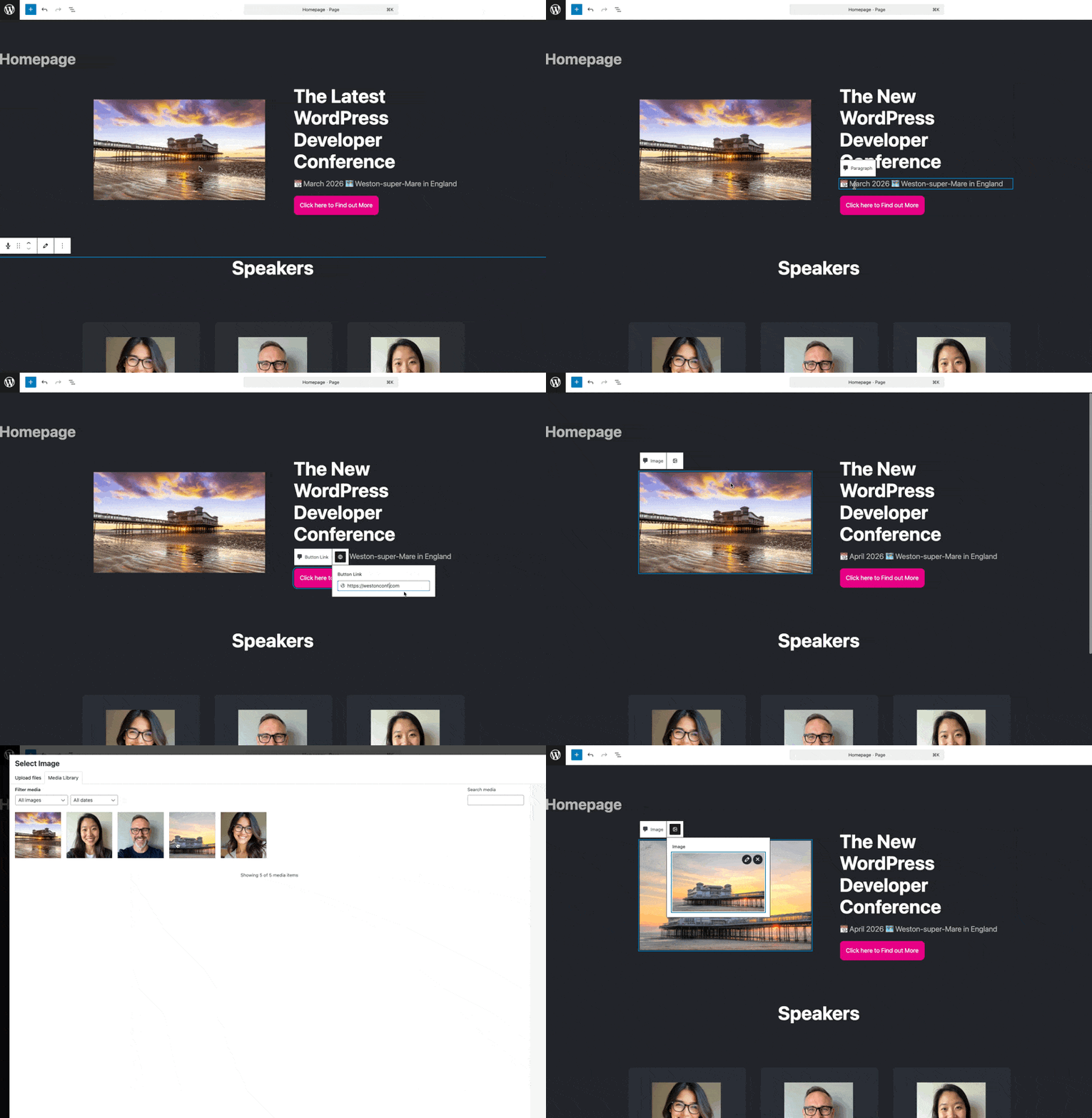
Inline editing provides two distinct experiences depending on the field type. Text and Text Area fields offer text editable inline editing—the most native-like feel where you can type directly into an element within the block preview.

All other supported field types use toolbar editable inline editing. When you click a field, a contextual pop-up toolbar appears with the familiar ACF editing interface, making it easy to update images, dates, links, relationships, and more.
Getting started
Inline Editing can be implemented automatically or manually depending on your needs. The full release notes provide complete technical details to get you started.
Inline Editing is only available to ACF Blocks that are using version 3. Learn more about upgrading your blocks to v3.
ACF Blocks is a feature only available in ACF PRO.
Connect with the ACF community
Want to dive deeper into what’s possible with ACF and connect with developers who are building incredible WordPress experiences? Join ACF Chat Fridays, a monthly office hours session where you can connect with experts, answer your most pressing questions, see the latest features, and stay ahead of the game with exclusive insights into the future of ACF.
Inline Editing is a groundbreaking feature for ACF Blocks – one that makes building with WordPress more simplified and user friendly without compromising design integrity or control. We can’t wait to see what you build with it.
Start the conversation.